
Superfetch Is the Index: A User-Mode Physical Memory Read on Windows
How Superfetch page metadata and an Object Manager redirect turn an NLS section lookup into a privileged, read-only physical-memory view, and where the technique stops.
I started with the wrong question: could Superfetch let a user-mode process write kernel memory?
The useful answer depended on a physical alias: a second virtual address that maps the same physical frame as some other address. Both mappings reach the same bytes, but each has its own page-table permissions. A page can therefore be writable through its original kernel mapping and read-only through a new user-mode alias.
The starting point was a 35-page proof of concept shared by Jonas Lyk. It composed two Windows subsystems: Superfetch supplied physical-page metadata, while a redirected National Language Support (NLS) section lookup exposed the bytes. It also left one failure unexplained: some updated machines returned insufficient-memory errors while others completed the map.
My work was to explain that topology-dependent failure, validate the read against an owned page and a live kernel object, and find the permission boundary. On the x64 Windows build 10.0.26100.x I tested, the returned alias was PAGE_READONLY. None of the user-mode routes I tried turned it into an arbitrary physical write.
This was not an unprivileged read. The tested chain ran as the Windows LocalSystem account (SYSTEM). The relevant Superfetch range and page frame number (PFN) queries required SeProfileSingleProcessPrivilege, and the Object Manager link was created while impersonating LocalSystem. I did not establish a standard-user or ordinary-administrator path.
Research boundary: all testing ran inside an owned Hyper-V virtual machine configured for kernel debugging. The debugger observed control flow and supplied ground truth; it never performed the reads or writes under test. Every write candidate first had to work against an owned, disposable Address Windowing Extensions (AWE) page.
An Index and a Window
Calling this a “Superfetch read” gives Superfetch too much credit. SuperfetchMemoryRangesQuery inventories populated physical-memory ranges. SuperfetchPfnQuery describes PFNs the caller has already selected, including how Windows is using each frame. They return identity and accounting metadata, not page bytes, a target structure, or the permissions on an existing virtual mapping.
The byte access comes from somewhere else. For NLS section type 11, Windows derives a name from the numeric identifier passed to NtGetNlsSectionPtr. The caller creates that expected name as an Object Manager symbolic link to \Device\PhysicalMemory, then asks for the matching NLS section. When the kernel opens the name, Object Manager follows the link and the memory manager maps the physical-memory section into the caller.
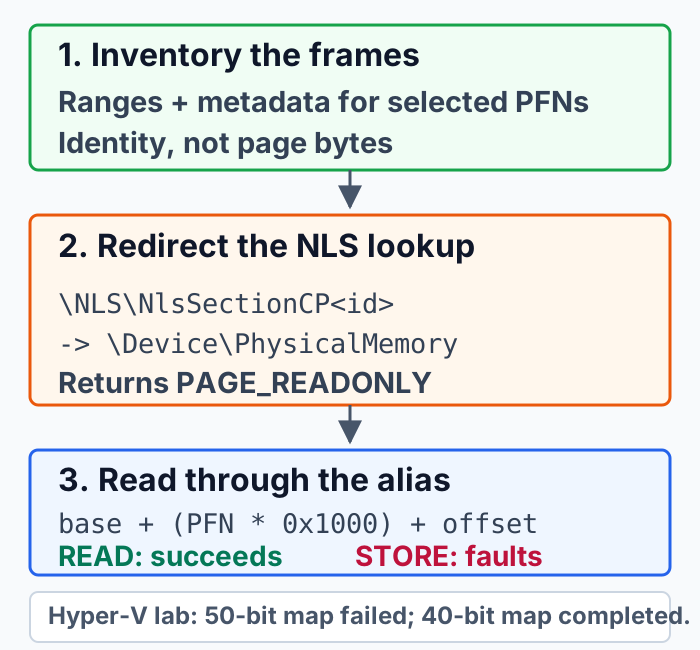
The path reduces to a name redirect, a read-only map, and address arithmetic:
\NLS\NlsSectionCP<unused-id> -> \Device\PhysicalMemory
NtGetNlsSectionPtr(11, unused_id, NULL, &physical_base, §ion_size)
page_address = physical_base + (PFN * 0x1000) + offsetThe 0x1000 multiplier is the 4 KB page size on this target. Once the view exists, the final load happens through the caller’s own address space; it does not use ReadProcessMemory or a handle to the target process. Finding a specific object is still a separate problem. A debugger, address translation, or a target-specific content scanner must supply the PFN and offset or recognize the bytes after the map.
The VM Wasn’t Out of Memory
My first guest never returned the alias. NtGetNlsSectionPtr spent minutes inside MiMapViewOfPhysicalSection and eventually returned STATUS_INSUFFICIENT_RESOURCES. Reducing installed memory from 4 GB to 512 MB did not change the outcome. The error was about the map, not installed RAM.
WinDbg exposed the real scale of the request. Hyper-V advertised a 50-bit physical-address width to a guest with about 8 GB of RAM. The physical-memory section consequently spanned 1 pebibyte, most of it a huge sparse non-RAM range rather than installed memory. While walking that range, the memory manager attempted to allocate tracking state until the allocation failed.
Constraining the same guest to a 40-bit physical-address width reduced the section span to 1 tebibyte. After a reboot, the same NLS call returned STATUS_SUCCESS and a read-only 1 TiB view. The lab change was made with Set-VMProcessor -VMName <VMName> -PhysicalAddressWidth 40.
That result is a reproducibility setting for this Hyper-V guest, not a mitigation or a universal 40-bit threshold. Installed RAM influenced where the sparse region began; the guest’s exposed physical-address topology determined how much address space the mapper tried to represent. A different Windows build, hypervisor, or physical map can behave differently.
Proving the Bytes Were Real
The first proof used AWE, a Windows facility for allocating physical pages and mapping them into a process. It gave me a caller-owned PFN, a legitimate PAGE_READWRITE mapping, and a disposable place to write a known marker. Reading the corresponding offset through the NLS alias returned the same marker. The test established that the new virtual address reached the same physical frame without putting someone else’s memory at risk.
The kernel proof raised the bar. An EPROCESS is the kernel object that represents a process. WinDbg identified the PFNs backing the System and lsass.exe EPROCESS allocations, and targeted Superfetch queries described both frames as pinned pages in nonpaged pool, the kernel allocation pool kept resident. The debugger supplied ground truth; it did not supply the bytes read by the scanner.
The scanner then walked the mapped physical ranges and found the live lsass.exe object through the alias:
nt_get_nls_section_ptr_status=STATUS_SUCCESS
physical_view_protect=PAGE_READONLY
status=eprocess_found
found_pfn=0x11bb3f
found_page_offset=0x80
dry_run=1
One image-name match would be weak evidence, so the scanner checked several fields together: process ID, image name, Process Environment Block pointer, object table, directory-table base, and active-process-list links. The combined match reduced the chance that arbitrary pool data happened to look like the target object.
The direct claim stops there. I read an owned AWE page and the kernel-resident EPROCESS object for lsass.exe. I did not read the process’s user address space, recover credentials, or validate every protected-process page. Other resident, exposed Virtual Trust Level 0 pages follow from the same physical-alias mechanism, but that broader reach is an implication rather than a separately universal test result.
The Alias Stops at Read-Only
Static analysis showed the physical section being opened with SECTION_MAP_READ and mapped with PAGE_READONLY. Runtime queries reported protection value 0x2, also PAGE_READONLY. The controlled AWE page made the consequence unambiguous:
AWE mapping:  PAGE_READWRITE
NLS alias:    PAGE_READONLY

read through NLS alias:       success
raw store through NLS alias:  STATUS_ACCESS_VIOLATION
backing AWE byte changed:     no
Both addresses referred to the same PFN. The AWE address could modify it because that mapping was writable. The NLS address could not because the processor checked the read-only page-table entry used by the store. Permissions belonged to the alias, not permanently to the physical frame and not to some other mapping of it.
The surrounding write search stayed in user mode and inside the caller’s process. VirtualProtect and NtProtectVirtualMemory did not upgrade the view. Self-targeted process-write APIs copied no bytes. AWE’s MEM_PHYSICAL reservation path accepted caller-owned pages but did not import the selected live kernel PFN. New-section, debug, and existing-handle experiments also failed to produce a caller-selected physical write.
No custom driver, debugger-assisted store, foreign-process mapping, or victim-process handle counted as the primitive. The bounded result is that, on this build and under those constraints, I found no route from the NLS alias to an arbitrary-PFN write. It is not a claim that every possible Windows component or future build has been exhausted.
What It Buys, and Where It Stops
The failed write does not erase the read. Once a privileged process has the alias, the target process’s normal virtual-memory access checks are no longer the byte-read boundary for resident, exposed Virtual Trust Level 0 (VTL0) frames. VTL0 is the normal Windows kernel and user environment; Virtual Trust Level 1 (VTL1) is the more isolated environment used by Virtualization-Based Security.
That opens useful research and defensive workflows: correlating PFN metadata with real contents, inspecting selected kernel pool objects or paging structures, acquiring specific pages for authorized forensics, and comparing memory-manager behavior across builds and hypervisors. It is still a rough research primitive, not a replacement for a supported acquisition driver.
Its limits are substantial:
- The tested chain used a SYSTEM context and private, build-sensitive interfaces; no lower-privileged path was established.
- A target page must be resident, exposed in VTL0, and covered by the completed physical view. Paged-out data is not present to read, and this work did not prove access to isolated VTL1 memory.
- The caller still needs the correct PFN and offset. Superfetch metadata neither types a page nor freezes it while the caller reads.
- PFNs can be reclaimed or reused between discovery and access, and live structures can change or tear during a scan.
- Mapping can consume significant time, address space, and kernel tracking resources, with success depending on the machine or guest topology.
- The view can cover non-RAM addresses. Arbitrary memory-mapped I/O or firmware reads were not validated and may fault or cause device side effects.
- The alias remained read-only, and the tested paths did not produce an arbitrary physical write.
For defenders, the interesting signal is the composition rather than either subsystem alone: an NLS-named Object Manager link targeting \Device\PhysicalMemory, broad privileged Superfetch queries, a matching synthetic NLS identifier, and an unusually large read-only physical view in one process. Those are investigation leads, not a promise that every step already has a convenient Event Tracing for Windows event.
I went looking for a user-mode physical write and came back with a narrower primitive and a clearer boundary.
Superfetch indexes the frames. NLS exposes the bytes. The alias’s page table decides what access you get.